







Recuva is a software with which you will be able to recover any file or document that you have lost or deleted by accident. The Piriform program was originally released back in 2007 by the creators of CCleaner and has become one of the most used and reputable maintenance tools for Windows, Mac and Android.
Not all is lost if you accidentally delete a file. Usually, when you delete a file or folder from your internal or external drive, you don’t erase its actual content; rather, the space it used to occupy gets marked as available to be overwritten by other content. That's why the sooner you try to recover what you've lost, the more likely it is that it hasn’t already disappeared forever. This means that, under normal circumstances, it will be very difficult to recover documents that were lost more than six months ago.
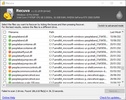
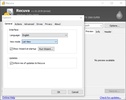
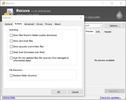
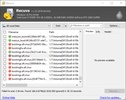
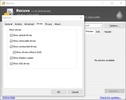
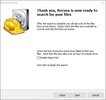
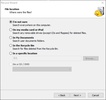
Luckily, Recuva is very easy to use. The only thing to do is specify the drive on which the search for lost files is to be performed and the directory in which you want to store the recovered files, if any. The program will perform an initial scan in which it will show you, in a very intuitive way, all the recently deleted files that, theoretically, could be restored. From the options menu, you can easily filter the list, leaving out those files with zero bytes or hidden documents.
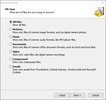
Unlike other programs, Recuva will let you recover information straight from damaged or recently formatted disks. As previously discussed, the longer the time between the recovery attempt and the formatting or damage, the less chance of recovery. Still, it is important to keep in mind that you can recover photos, music, documents, videos or any other type of file that you have lost. You can even try to recover data from memory cards or USB sticks.
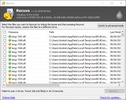
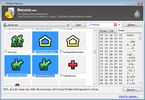
Before starting the recovery process, which can sometimes take quite a long time, Recuva will report on the recoverability of the file —that is, whether the clusters where the information was stored have been overwritten or not. If in the results table you see a file with a red circle, recovery is impossible; whereas if you see a green circle, you will be able to retrieve the data with almost total certainty. The orange circle, as expected, indicates uncertain results.
Recuva is one of the best software for restoring and recovering lost data from your hard drive. This is mainly because it offers a very high percentage of results, while also being very, very easy to use. And all of this via a simple and elegant interface that in a matter of seconds will let you know if you will be able to see again that photo that got deleted by mistake last week.
Frequent questions
Which files can you recover with Recuva?
Recuva lets you recover any deleted file on your computer. In addition, you can filter by file type to speed up your search, choosing between photos, music, documents, video, email, and more.
Can Recuva recover very old files?
Depending on the usage of the drive the file was stored on, Recuva can recover files from several months or even years ago, as long as none of the data was overwritten. If something has been overwritten, it can no longer be recovered.
Where should I save the files Recuva recovers?
If you're going to recover deleted files from a drive, it's important to save the file you recover on another drive, either internal or external, so it doesn't overlap with parts of the old file.
Why don't all my deleted files show up after scanning with Recuva?
Recuva has two scanning modes: one is fast, and the other is more thorough. If the first type doesn't include the deleted file, try the second type, which takes more time but is also more exhaustive.


 49 reviews














Comments
Awesome
The photo gallery is restored.
I am surprised... this is the best for recovering videos, audios, and others after formatting my computer. Top-notch, it's worth it, free...
Nice excellent
Excellent work
Very good and effective